
I built lean coding agent workflows because popular frameworks can be slow and token-hungry
Popular coding agent frameworks can be slow and token-hungry: huge ceremony fills the context on every request, and even a one-line fix goes through a full plan-and-review loop. In my experience, newer models don’t need that much handholding and that many guardrails. Without a framework, agents tend to skip planning entirely. Lean Coding Agent gives Codex and Claude Code a plan → test-first implementation → independent review loop that runs only when you ask for it. A separate subagent handles each step in its own context.
Predefined workflows set the loop and its stop conditions without scripting every move. Each subagent prompt is at most 135 lines. The define-conventions skill captures your project’s rules. Those rules follow progressive disclosure: instead of piling everything into AGENTS.md, agents load each convention file by topic only when a task needs it. The always-loaded baseline stays under 800 words, and each workflow stays under 450.
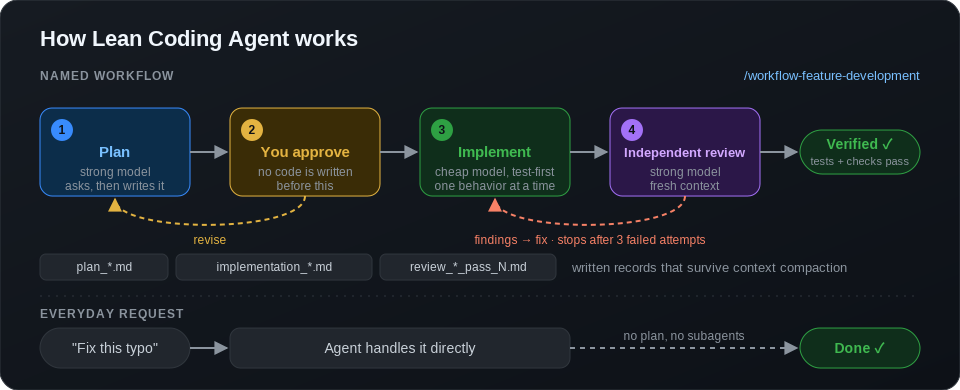
The baseline has three parts:
- Workflows. The feature, bug-fix, and refactor workflows follow one loop. You approve a plan, then an implementer and a reviewer iterate until the reviewer approves. Implementation follows test-driven development, one behavior at a time. If the same problem survives three fix attempts, the loop stops and reports back. Planning and code review can also run on their own.
- Subagents. Each step runs in a subagent with its own context: planner, bug diagnostician, implementer, or code reviewer. An explorer looks up facts when needed. Each subagent is defined in a prompt file of at most 135 lines.
- Project conventions. The
define-conventionsskill scans your repo, asks about the rules the code doesn’t show, and writes them todocs/conventions/. It writes separate files for coding standards, testing, change process, and deployment. Agents load only the files the current task needs, so a testing change readsTESTING.mdand nothing about deployments.
The agent handles normal requests directly. To use a workflow, you start it by name.
I wanted short instructions, few new tools to learn, and no mandatory workflow for small requests. For larger changes, I wanted a simple loop: plan, implement, review. The rest of this post explains the choices behind that.
Small requests run directly
Most requests don’t need a process. “Rename this variable” or “fix this import” should cost one turn. So the baseline makes no workflow mandatory. A normal request goes straight to the agent.
When a change is big enough to plan, you start a workflow by name:
/workflow-feature-development Add CSV export to the orders page
In Codex, you type $workflow-feature-development instead. The workflow skills set disable-model-invocation: true in Claude Code and policy.allow_implicit_invocation: false in Codex. The agent can’t decide on its own that your request deserves the full loop. You decide when to pay for planning and review.
The loop stops after three failed fixes
Five workflows ship with the baseline: planning, feature development, bug fixing, refactor, and review. The three change workflows share one loop:
- A
plannersubagent writes a plan with scope, acceptance criteria, risks, and verification steps. - You approve the plan. Nothing gets implemented before that.
- An
implementersubagent works test-first, one behavior at a time, through red, green, and refactor. - A
code-reviewersubagent reviews the change and returnsAPPROVE,WARNING, orBLOCK. - On
BLOCK, the implementer gets only the concrete findings and tries again.
If the same problem survives three fix attempts, the loop stops and reports back. An agent that retries forever burns tokens and hides the real problem. Three attempts is enough to fix a mistake, and few enough that a design problem reaches a person fast.
Each workflow also has hard boundaries. A bug fix needs an approved diagnosis from a bug-diagnostician first. A refactor stops if behavior would change. A review never edits code. Any workflow stops if success would mean weakening a test or growing the approved scope.
Each step runs in its own context
Every role runs as a separate subagent with fresh context. The main reason is review. An agent that checks work it just wrote shares every assumption it made while writing it, and it tends to approve itself. A reviewer that only sees the plan, the diff, and the test evidence has to judge the result on its own.
Separate contexts need a shared record, so each workflow writes files:
| Record | Path |
|---|---|
| Approved plan | .agents/plans/plan_YYYYMMDD_<name>.md |
| Implementation report | .agents/implementation-reports/implementation_YYYYMMDD_<name>.md |
| Review pass | .agents/code-reviews/review_YYYYMMDD_<name>_pass_N.md |
These files survive context compaction and new sessions. If a session dies halfway, the next one reads the plan and the last review instead of starting over.
Strong models plan and review, cheap models execute
By default, the expensive models do the work that needs judgment, and cheap models do the execution. Strong models plan and review at low reasoning effort. Cheap models diagnose, implement, and look up facts at high effort.
| Subagent | Claude Code | Codex |
|---|---|---|
planner |
opus, low |
gpt-6.1-sol, low |
code-reviewer |
opus, low |
gpt-6.1-sol, low |
bug-diagnostician |
haiku, xhigh |
gpt-6-luna, xhigh |
implementer |
haiku, xhigh |
gpt-6-luna, xhigh |
explorer |
haiku, high |
gpt-6-luna, high |
A cheap implementer sounds risky, but by the time it runs, the hard decisions are made. You approved the plan. The tests define “done”. A stronger model reviews the result. What’s left is careful execution, and a cheap model at high effort does that for a fraction of the cost. If your codebase needs more judgment at implementation time, you pick a stronger implementer during setup.
The planner runs at low effort for a different reason. Planning is interactive. You answer its questions, so fast turns matter more than long solo thinking.
Instructions stay short
Every word in AGENTS.md or CLAUDE.md loads on every request, typo fixes included. Long instruction files cost tokens and dilute the rules that matter. The baseline sets hard budgets:
- The always-loaded baseline stays under 800 words.
- Each workflow stays under 450 words.
- Each subagent prompt is at most 135 lines. The longest is the code reviewer, and the explorer is 8 lines.
I also left out most of the hand-holding that bigger agent frameworks carry. Newer models don’t need pages of generic rules. They need a precise plan for the task in front of them and a short loop with clear stop conditions.
Project rules load by topic
A shared baseline can’t know your project. The define-conventions skill fills that gap. It scans your repo, interviews you about the rules the code doesn’t show, and writes separate files under docs/conventions/ for coding standards, testing, change process, and deployment.
Agents load these files only when the task needs them. A testing change reads TESTING.md and nothing about deployments. I wrote about why the skill interviews you instead of trusting the scan in Coding agent conventions: grill the team, don’t scan the repo.
Installed skills get a similar treatment. To add project guidance to a skill such as tdd, you write an override file in .agents/skill-overrides/ and link it from INDEX.md. The agent reads the override before it uses the skill. The skill itself stays untouched, so upstream updates still apply.
Setup is one command and a diff
You install the skills with the Skills CLI and run setup inside your project:
npx skills@latest add aloilor/lean-coding-agent
Then run /setup-lean-coding-agent in Claude Code or $setup-lean-coding-agent in Codex. Setup asks which agents to configure and which model each subagent uses. It writes only inside your project and never touches source code, so git diff shows every change and git checkout . undoes it.
One warning before you run it: setup replaces AGENTS.md and CLAUDE.md on every run. Move shared rules to docs/conventions/ and private notes to AGENTS.override.md first. Setup never overwrites those.
What the tests don’t cover
The automated tests cover setup. They don’t cover how agents behave once they use the skills. The define-conventions evaluation so far used scripted answers, not real interviews. I’m treating the loop design as a strong opinion backed by daily use, not a measured result.
The repo is MIT-licensed and builds on skills from Matt Pocock, Anthropic, and GitHub’s awesome-copilot. If you try it, I’d like to hear where the loop stopped when it shouldn’t have, or kept going when it should have stopped.